
Goldfish or Goldmine: Knowledge Bases in the Agentic AI Era

The idea that knowledge is power is nothing new. Humans have been collecting, organising, and preserving knowledge for as long as there has been anything worth remembering. Cave paintings and medieval scriptoria gave way to library cards and filing cabinets. Then computers changed the scale of the exercise. Companies began filling hard drives, data lakes, and cloud storage with vast amounts of data. Before long, a familiar pattern emerged: ingest raw data, clean and curate it, and serve it in a form that helps people make better decisions.
There is a growing assumption that the agentic AI era will simply place LLMs at the end of today's data stack, leaving the rest largely unchanged. But that misses the real shift. The old stack was built for precision: clean the data, structure it, send it to a dashboard or model. Agentic AI needs something different. It needs context — meaning, relationships, history, exceptions, and the surrounding information that explains how the business or environment actually works.
The second part, and what makes this especially timely, is that today's AI agents are already capable of helping create, curate, and maintain this kind of knowledge base. In this article, we will use Obsidian and a coding agent to set up a small example, not as a production system, but as a practical demonstration of why this approach matters.
A quick note on document search
Before getting into the setup, it's worth naming the thing this approach is quietly replacing. The standard way to get AI to work with your documents today is retrieval-augmented generation, usually shortened to RAG. You dump your files into a system, and every time you ask a question, the system searches for relevant chunks and hands them to the model to write an answer. It works, but nothing accumulates. Ask the same question twice and it does the same search twice. The documents are the memory; the system is a goldfish.
The approach here inverts that. The AI builds and maintains a structured layer that sits between you and the raw sources, and that layer is what gets queried, not the documents themselves. The synthesis happens once and stays. Every new source makes the layer denser. Both approaches have their place. RAG is still the right tool for large, static corpora where you mainly need search. But for anything you are trying to actually learn over time, an agent-maintained knowledge base is a different category of thing.
Why Obsidian?
Obsidian is a knowledge management tool built on Markdown, a simple plain text format that is easy to read and write. That means your notes live as files you own on your machine, rather than inside a closed system.
What makes Obsidian particularly powerful, and especially relevant to AI, is what you can build on top of those notes: internal links, tags, search, graph views, plugins, and publishing tools. On its own, that already makes it a strong knowledge management system. The arrival of coding agents has made it significantly more interesting, because those agents can now create, maintain, update, and organise these knowledge bases at scale.
What follows is a quick guide to building something similar. We use a messy set of articles from X and Medium on Polymarket trading strategies as our test case, and show how this setup can turn scattered information into a knowledge base that is far easier to navigate, connect, and build on.
Setting it up
The whole setup takes under an hour and costs nothing beyond a Claude subscription. Here is what you need and why.
Step 1: Install Obsidian. Obsidian is free, runs on Mac, Windows, and Linux, and is the front end you'll use to browse your knowledge base. Think of it as a smart notebook that understands how pages link to each other. Download it from obsidian.md and open it. That's the whole install.
Step 2: Create a vault. In Obsidian, a vault is just a folder on your computer that holds your notes. Create a new one — I called mine polymarket-wiki. Inside it, make two subfolders: raw/ for source material (articles, PDFs, anything you want to feed in) and wiki/ for the structured pages the agent will build. Keeping raw sources separate from the organised knowledge matters later, because the agent will never modify the raw material. It only reads from it.
Step 3: Install Claude Code (or Codex). Claude Code is a terminal tool that lets you run Claude as an agent inside a specific folder. Unlike the regular Claude chat interface, Claude Code can read files, write files, and work across an entire project. One command installs it:
npm install -g @anthropic-ai/claude-codeYou'll need Node.js installed first. Once it's done, you can run claude from anywhere in your terminal.
Step 4: Clip some sources into the vault. For this demo I used Obsidian Web Clipper, a free browser extension that turns web articles into clean markdown files and drops them straight into your vault. I pointed it at the raw/ folder and clipped twelve articles from X and Medium on Polymarket trading strategies. Five minutes of work. You can use anything you want as source material — papers, blog posts, transcripts, PDFs, your own notes.
Step 5: Write the schema file. This is the one part of the setup that matters most, and the one almost no one thinks to do. The schema is a single markdown file called CLAUDE.md that sits at the top of your vault. Claude Code reads it automatically every time you start a session, and it tells the agent how you want your knowledge base to work. Mine covered six things:
- The categories of page the agent should create (strategies, markets, authors, anti-patterns)
- How each page should be structured (claim, evidence, tensions, open questions)
- How sources should be tagged for credibility
- What to do when a new source contradicts an existing page
- When to create a new page versus updating an existing one
- The tone — opinionated rather than neutral, with contradictions surfaced rather than hidden
None of that is complicated. The whole file is about two pages of plain English. But it is the difference between an agent that produces tidy summaries and one that produces an opinionated, internally consistent knowledge base. Without a schema, every session is improvised. With a schema, the agent becomes a disciplined maintainer that behaves the same way every time.
Step 6: Start the agent. Open a terminal, navigate to the vault folder, and run claude. The agent reads your schema, surveys the vault, and waits for instructions. You are now ready to ingest your first source.
What the agent actually did
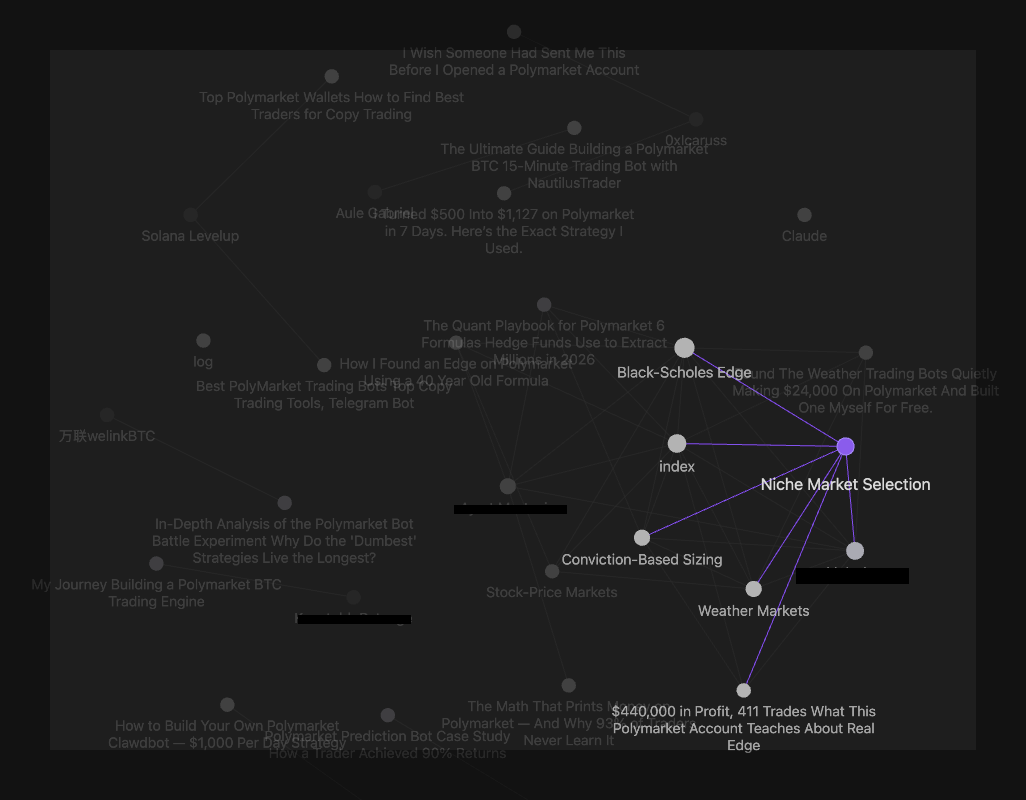
Once the setup was in place, I started feeding articles into the vault one at a time. Each ingest followed the same rhythm: the agent read the source, came back with a proposal — what pages to create, which claims were solid, which were hand-waved, which author it was coming from — and waited for me to approve before writing anything. My job was to push back and correct. Its job was the bookkeeping: creating pages, updating the index, resolving cross-references, logging changes. A single article might touch ten files in one pass.
Four articles in, the vault had five strategy and market pages, two author pages, and a handful of synthesis notes. The interesting part isn't the page count. It's what the combination of agent and schema had started doing underneath.
Sources get classified, not just summarised. The schema required every claim in the vault to be tagged with the kind of source it came from: a framework (someone proposing a method), evidence (someone showing real results), or operator experience (my own trades and observations). This distinction sounds small but it changes everything downstream. A $24,000 profit figure in a headline with no wallet address and no trade log is not evidence, no matter how specific the number looks. The schema forces the agent to downgrade it. Over time, the vault stops being a pile of summaries and starts being a structured record of what is actually supported and what is just asserted.
Guardrails filter out the noise. Every ingest added or reinforced rules about what the vault should accept. Unsourced profit claims get flagged. Listicle-style sources that gesture at six ideas shallowly get absorbed into existing pages rather than spawning six new ones. Cherry-picked wins without the losing trades behind them get tagged as survivorship bias. The guardrails are all sitting in the schema file, which means they compound — once a rule is written, every future ingest inherits it. The vault gets more discerning as it grows.
Author pages give every source texture. When an article gets ingested, the agent doesn't just summarise it. It asks who wrote it, whether they're a known author in the vault, and how they've performed before. If it's a new author, it creates a short author page — where they publish, whether they're selling something, whether there's an affiliate link involved, what their credibility tier looks like. If it's an author who has already appeared, it updates their page. One author in this session wrote two of my four articles: the first analytically strong, the second a shallow listicle with made-up numbers. His author page now says exactly that. Next time I see his name, the context is already there. The vault has developed a memory of who I'm reading.
New sources land into existing context. This is the part that makes the vault actually useful. When I dropped the fourth article in, the agent didn't treat it as a standalone thing. It checked the six concepts in the article against everything already in the vault and asked: is this genuinely new, or is it a retread? Two of the concepts already had pages and just needed additions. Two were too shallowly covered in the new source to justify anything. Two were novel and got parked as candidates for future development if a better source arrived. The result was zero new pages and a denser vault. A normal search-based knowledge base would have just filed the article away; this one asked whether the article actually contributed anything, and absorbed only the parts that did.
Connections emerge that none of the sources contained. By the fourth ingest, three of the strategies in the vault had come from different articles on unrelated topics — options pricing on stock markets, weather forecasts, political research in niche markets. The agent noticed that all three were variations on a single underlying idea: find a way to estimate the true probability of an event better than the crowd, and bet when the crowd disagrees. That synthesis now lives on one of the pages, explicitly connecting the three strategies. It exists in my vault and in none of the original sources.
A caveat
This is not the final version of how any of this should work, and I am not presenting it as one. Obsidian plus a coding agent plus a schema file is one way to get the pattern running on your own machine today, with tools that already exist. The specifics will change. Better agents, purpose-built tools, tighter integrations, smarter schemas, all of that is coming. What I wanted to show here is the shape of the idea, not the definitive implementation.
Where this is going
The real shift is not the tooling. It is that knowledge bases are moving from things humans maintain to things agents can help maintain, and that changes what a knowledge base can be. What used to be a filing system becomes a maintained layer of context. It stops being a place you put things and starts becoming part of the working memory an agent needs to do useful work on your behalf.
The quality of any agent's output is capped by the quality of the context it has to work with. For the first time, that context is something a single person can build in an afternoon and improve over time.